0%

Choosing a Mini Camera for business use is not simply a matter of buying the smallest device. The right choice depends on what you need to see, where the camera will operate, and how footage will be stored. A retail owner may need clear detail at a checkout, while a small office may prioritize reliable coverage of an entrance. These are different jobs. Small cameras can also have limits, including weaker low-light performance, shorter battery life, or narrow viewing angles.

Industry growth makes careful selection increasingly relevant. MarketsandMarkets’ Video Surveillance Market report estimated the market at USD 53.7 billion in 2023 and projected it to reach USD 83.3 billion by 2028, a 9.2% compound annual growth rate. That figure reflects broad surveillance demand, not a guarantee that every compact camera will suit a business. Still, it points to a crowded market where specifications deserve close attention. Resolution alone is not enough.

This guide compares image quality, field of view, power options, storage, connectivity, and installation needs. Check how a camera performs in the actual setting: a dim stockroom, a bright storefront window, or a busy reception area. Review manufacturer specifications, independent testing, and warranty terms before deciding. Also consider privacy, access controls, and clear notice where cameras are used. A product page may look reassuring. Real-world performance can be less tidy. A practical choice balances dependable footage with responsible use, and leaves room to reassess after installation.
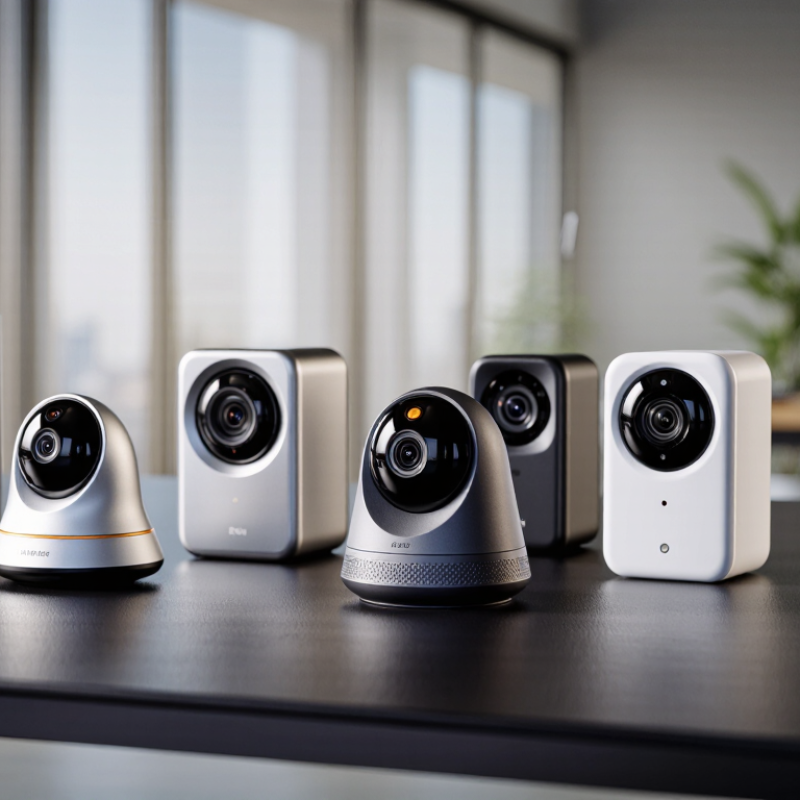
How to Choose the Best Mini Camera for Your Business?

Identify the Business Tasks a Mini Camera Must Support

Before comparing mini cameras, identify the business task each one must support. Write down where it will be used, what needs to be seen, and who will review the footage. A stockroom camera may need a wide view of shelves and doorways. A service counter may need a clear image of handoffs, not close-ups of every customer.

Small device, clear purpose.

Check practical limits. Measure the mounting space, note the distance to the activity, and test the view during normal working hours. A camera that looks sharp in an empty room may struggle with backlighting from a glass entrance.

For mobile inspections, battery life and simple file transfer may matter more than continuous recording. At a loading area, stable mounting and enough storage can be more useful than extra features.

Decide how footage will be protected and managed before installation. Limit access to people with a real business need, set a sensible retention period, and follow applicable privacy requirements. Audio recording is not automatically useful; it can capture more personal information than the task requires.

A common planning mistake is choosing the smallest camera before defining the job. I would pilot one unit in the intended location, review sample footage, and revise the requirements.

The first plan may be wrong. That is worth discovering early.

Set Requirements for Image Quality, Size, Power, and Storage

A useful mini camera starts with a written list of what it must show. For a checkout counter, readable receipts and clear faces may matter more than cinematic color. Check resolution in the actual lighting, not only in a bright showroom. Small details matter. Test motion too: a quick hand movement can blur even a sharp still image. If footage needs later review, confirm that details remain legible after compression and cropping.

Size choices depend on placement and sightlines. Measure the available shelf, wall, or display housing, then check whether the lens has an unobstructed view. A smaller body is not automatically better if it overheats or becomes difficult to adjust.

For power, compare expected runtime with operating hours, and allow a margin for colder rooms or aging batteries. Wired power can reduce interruptions, but cable routing should stay neat and accessible.

Storage deserves equal attention. Estimate daily recording volume, retention needs, and how quickly staff can retrieve a clip. Local storage may suit short reviews; network storage can help when several authorized managers need access.

I would test one unit for a full workweek before standardizing; that trial can expose awkward details nobody planned for.

Compare Connectivity, Compatibility, and Management Features

A mini camera can fit neatly above a stockroom door, but its connection matters more than its size. Check whether it uses Wi-Fi, Ethernet, or both, and test the signal where it will be installed. A strong signal in the office may not reach a concrete-walled loading area. Live video should remain stable during busy periods, not just during setup.

Compatibility can save hours later. Confirm that the camera works with your existing phones, computers, network, and recording system. Ask which video formats and integrations are supported, and whether remote viewing requires a separate service. Test the setup with the people who will actually use it. I have seen a technically capable device become inconvenient because the mobile app was slow on an older phone. Small detail, real impact.

Management features matter across multiple locations. Look for clear user permissions, simple camera naming, and searchable recordings with reliable time stamps. A manager may need access to several sites, while a shift lead needs only one view. Check how updates are delivered, how long footage can be stored, and how quickly a recording can be exported. Keep the settings understandable. Overly complex controls can lead to inconsistent use, and that is easy to overlook. Before choosing, compare the full workflow from installation to routine review, not only the camera’s advertised resolution.

Check Privacy, Security, and Legal Compliance

Before comparing image quality, decide what the camera must observe—and what it must never capture. A doorway view may be enough; a lens aimed at a staff break table is not. Check local privacy rules for notice, lawful purpose, audio recording, and retention periods. Requirements vary by location, so ask a privacy lead or legal adviser to review the plan. Small details matter.

Security is part of privacy. The 2024 Data Breach Investigations Report found that 68% of breaches involved a human element, including mistakes and social engineering. This is a useful warning, not a camera-specific risk estimate. Choose devices with unique accounts, multi-factor authentication, encrypted connections, timely updates, and role-based viewing. Disable remote access you do not need. Test it.

Ponemon Institute’s 2024 data-breach study estimated the global average breach cost at $4.88 million. A camera system can add exposure if default passwords remain, footage stays forever, or shared links circulate. Set a clear retention period, log exports, restrict playback, and test deletion. Honestly, convenience often wins unless someone checks. Review access quarterly, and document why each camera remains necessary.

How to Choose the Best Mini Camera for Your Business? - Check Privacy, Security, and Legal Compliance

Decision Factor What to Check Recommended Business Standard Warning Sign
Purpose and placement Define the specific security need and map the camera’s field of view before installation. Use a visible, appropriately positioned camera focused on relevant business areas, such as an entrance or stockroom. Covert placement or coverage of areas where people reasonably expect privacy, such as restrooms or changing rooms.
Video and image quality Check resolution, low-light performance, viewing angle, and whether faces or relevant details are identifiable at the intended distance. Test the camera in the actual location and lighting conditions; choose only the image detail needed for the stated purpose. A wide-angle view that captures unnecessary areas, or image quality too poor to support the intended use.
Audio recording Confirm whether the device records audio and whether audio can be disabled independently of video. Keep audio off unless there is a documented need and local legal review supports recording it. Audio-recording rules vary by jurisdiction. Audio is enabled by default, difficult to disable, or recorded without checking applicable consent and notice requirements.
Notice and transparency Check requirements for informing employees, customers, visitors, or other people who may be recorded. Provide clear, appropriately placed notices and explain the purpose, recording scope, and contact point where required. Assuming a sign alone satisfies every legal obligation; notice and consent requirements depend on the location and circumstances.
Access control Review user permissions, administrator controls, account security, and access logs. Use unique accounts, strong authentication, least-privilege access, and multi-factor authentication where available. Shared default passwords, unrestricted staff access, or no way to review who accessed footage.
Data protection and storage Find out where footage is stored, how it is protected in transit and at rest, and who can access it. Choose documented security controls, encrypted connections, and storage arrangements suitable for the sensitivity of the footage. Unclear storage locations, undocumented data handling, or no information about security safeguards.
Retention and deletion Check whether retention can be configured and whether recordings can be securely deleted. Set a documented retention period based on business need and applicable law; delete footage when it is no longer needed, unless preserved for an incident or legal hold. Indefinite storage by default or no practical way to delete recordings.
Updates and ongoing support Check the update process, vulnerability reporting, support period, and ability to change credentials. Prefer a device with a clear security-update process; install updates promptly and remove unsupported devices from sensitive networks. No update information, unsupported software, or credentials that cannot be changed.
Legal and privacy review Identify the relevant jurisdictions, workplace rules, privacy obligations, and any cross-border data transfers. Document the purpose and assessment before deployment. For example, GDPR may apply to personal-data processing in its scope; requirements differ by jurisdiction. Treating one country’s rules as universal or deploying before checking local requirements.

Note: This table provides general selection guidance, not legal advice. Confirm applicable privacy, employment, audio-recording, and data-protection requirements in each relevant jurisdiction before installation.

Evaluate Total Cost, Reliability, and Vendor Support

How to Choose the Best Mini Camera for Your Business?

Evaluate Total Cost, Reliability, and Vendor Support

A mini camera’s purchase price is only the visible part of its cost. Budget for mounts, storage, installation, network capacity, and replacement batteries. A low-cost unit can become expensive when staff spend hours retrieving clips or resetting devices. That happens.

Judge reliability in the actual setting: a warm stockroom, a dusty loading area, or a weak Wi-Fi corner. Check recording consistency, night detail, retention options, warranty length, and firmware-update policy before ordering. Uptime Institute’s 2024 Annual Outage Analysis found that 54% of respondents said their latest significant outage cost more than $100,000; 16% reported more than $1 million. Those figures concern data-center outages, not cameras, but they show how interruptions can outweigh equipment savings. Ask vendors for documented support response targets, replacement timelines, and escalation routes. A vague “available anytime” promise is not enough.

Tips: Test two units for a week in the intended location. Review footage on the phone and network employees will actually use. Keep a spare. Record support replies and firmware dates, then compare annual costs—not just checkout prices.

FAQS

How should a business choose a mini camera?

Define the task before comparing devices. A stockroom may need shelves and doorways in view, while a counter may need clear handoff footage.

What should be tested at the installation site?

Measure the mounting space and distance to the activity. Check the view during normal hours, especially near glass entrances or concrete walls. Test it first.

How can a business judge image quality?

Review footage in the actual lighting. Check whether receipts, faces, or moving hands stay clear after compression and cropping.

Does a smaller camera always work better?

Not necessarily. A tiny body may overheat or be hard to adjust. Check its sightline and mounting position before choosing.

How should power and storage needs be estimated?

Compare battery runtime with operating hours, allowing extra time for colder rooms or aging batteries. Estimate daily footage and how long it must remain available.

Which connectivity features matter?

Test Wi-Fi or Ethernet where the camera will sit. A strong office signal may not reach a loading area. Small detail, real impact.

What compatibility and management details should be checked?

Confirm support for existing devices and recording systems. Check user permissions, searchable timestamps, updates, and clip exports. Test the workflow with actual staff.

How should footage access and retention be managed?

Give access only to people with a business need, and set a sensible retention period. Audio may capture more personal information than necessary.

Is a short pilot worthwhile before buying several units?

Yes. Test one camera for a full workweek and review sample footage. My first plan may be wrong, and that is useful to discover early.

Conclusion

Choosing the best Mini Camera for your business starts with identifying the tasks it needs to support, such as monitoring a workspace, documenting processes, or observing equipment. These needs will guide your choices for image quality, camera size, power options, and storage capacity. Consider where the camera will be placed and how long it must operate, so its practical limits match your day-to-day requirements.

Next, compare connectivity, compatibility with your existing systems, and tools for managing access or reviewing footage. Check that the camera can be used in a way that respects privacy and complies with applicable rules, including any requirements for notice or data handling. Finally, weigh the total cost against reliability, maintenance needs, and the quality of vendor support. A careful comparison helps you select a Mini Camera that fits your workflow, budget, and responsible-use standards.

Evelyn

Evelyn

Evelyn is a professional marketing specialist with a strong understanding of the company’s products, services, and the needs of the people they are designed to support. She regularly contributes expert articles to the company website, turning product knowledge and industry insights into clear,......